What are (React) Components?
Every webpage can be divided into smaller units. An example of such a division could look like this:
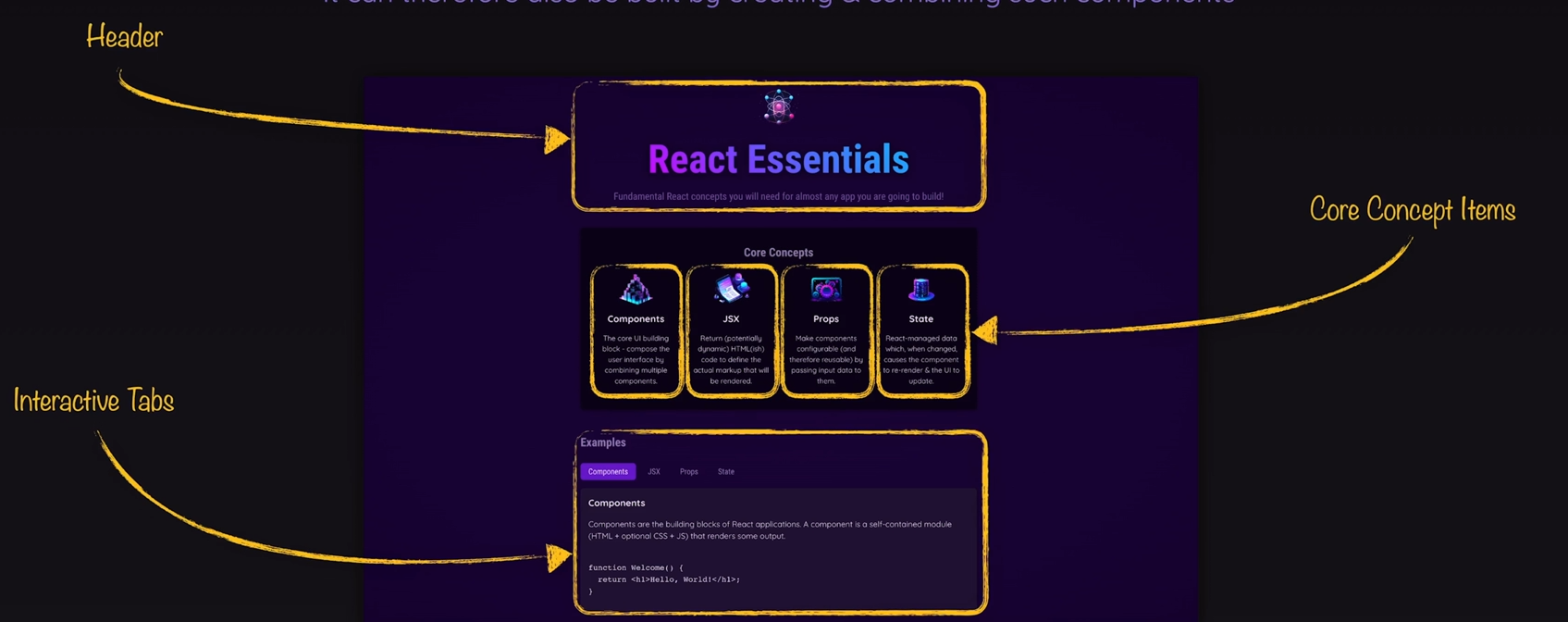
The React code for this webpage could look like this:
//App.jsx
import { useState } from 'react';
import { CORE_CONCEPTS } from './data.js';
import Header from './components/Header/Header.jsx';
import CoreConcept from './components/CoreConcept.jsx';
import TabButton from './components/TabButton.jsx';
import { EXAMPLES } from './data.js';

function App() {
  const [selectedTopic, setSelectedTopic] = useState();
  function handleSelect(selectedButton) {
    setSelectedTopic(selectedButton);
  }
  let tabContent = <p>Please select a topic.</p>;
  if (selectedTopic) {
    tabContent = (
      <div id="tab-content">
        <h3>{EXAMPLES[selectedTopic].title}</h3>
        <p>{EXAMPLES[selectedTopic].description}</p>
        <pre>
          <code>{EXAMPLES[selectedTopic].code}</code>
        </pre>
      </div>
    );
  }
  return (
    <div>
      <Header />
      <main>
        <section id="core-concepts">
          <h2>Core Concepts</h2>
          <ul>
            {CORE_CONCEPTS.map((conceptItem) => (
              <CoreConcept key={conceptItem.title} {...conceptItem} />
            ))}
          </ul>
        </section>
        <section id="examples">
          <h2>Examples</h2>
          <menu>
            <TabButton
              isSelected={selectedTopic === 'components'}
              onSelect={() => handleSelect('components')}
            >
              Components
            </TabButton>
            <TabButton
              isSelected={selectedTopic === 'jsx'}
              onSelect={() => handleSelect('jsx')}
            >
              JSX
            </TabButton>
            <TabButton
              isSelected={selectedTopic === 'props'}
              onSelect={() => handleSelect('props')}
            >
              Props
            </TabButton>
            <TabButton
              isSelected={selectedTopic === 'state'}
              onSelect={() => handleSelect('state')}
            >
              State
            </TabButton>
          </menu>
          {tabContent}
        </section>
      </main>
    </div>
  );
}
export default App;
//Header.jsx
import reactImg from '../../assets/react-core-concepts.png';
import './Header.css';

const reactDescriptions = ['Fundamental', 'Crucial', 'Core'];
function genRandomInt(max) {
  return Math.floor(Math.random() * (max + 1));
}

export default function Header() {
  const description = reactDescriptions[genRandomInt(2)];
  return (
    <header>
      <img src={reactImg} alt="Stylized atom" />
      <h1>React Essentials</h1>
      <p>
        {description} React concepts you will need for almost any app you are
        going to build!
      </p>
    </header>
  );
}
//CoreConcept.jsx
export default function CoreConcept({ image, title, description }) {
  return (
    <li>
      <img src={image} alt={title} />
      <h3>{title}</h3>
      <p>{description}</p>
    </li>
  );
}
//TabButton.jsx
export default function TabButton({ children, onSelect, isSelected }) {
  return (
    <li>
      <button className={isSelected ? 'active' : undefined} onClick={onSelect}>
        {children}
      </button>
    </li>
  );
}
We can see that the React files end with a .jsx extension. This is an extension of JavaScript. React transforms the code (into HTML, CSS, and JavaScript) because browsers do not support React code.
The return value of a React component is JSX code.
What are the Advantages of a Component-Based React Application?
Even in this manageable application, we can clearly see that a functional division makes the code more understandable and allows us to reuse components on different pages without having to write duplicate code. For example, we could use the Interactive Tabs on another page (if the application provides it) without needing to write the same code twice.
The possible directory structure could therefore look like this:
/
├── src/
│   ├── components/
│   │   |  Header.jsx
│   │   |  CoreConcept.jsx
│   │   |  TabButton.jsx
│   │   |  legal
│   ├── App.jsx
│   └── data.js