Passing props down can increase complexity in larger applications, as shown by the following example:
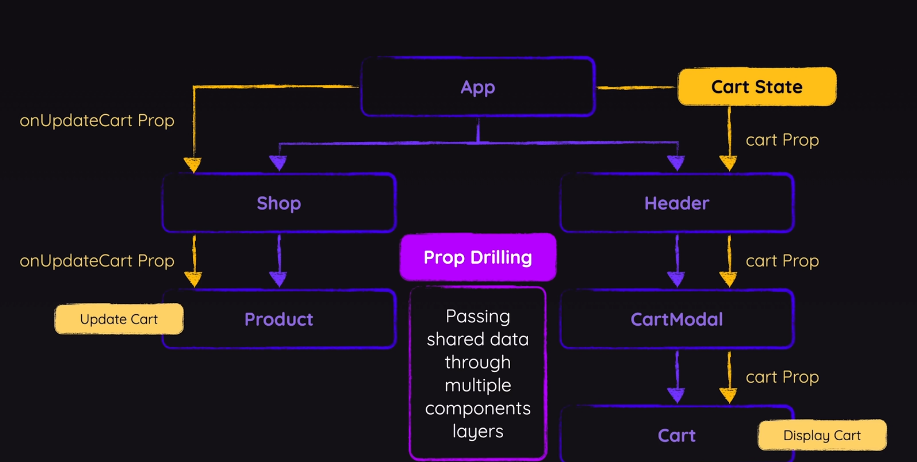
There are several ways to solve this problem.
Option 1 - Change Component Structure
- Before
//App.jsx
<Shop onAddItemToCart={handleAddItemToCart} />
//Shop.jsx
import { DUMMY_PRODUCTS } from "../dummy-products.js";
import Product from "./Product";

export default function Shop({ onAddItemToCart }) {
  return (
    <section id="shop">
      <h2>Elegant Clothing For Everyone</h2>
      <ul id="products">
        {DUMMY_PRODUCTS.map((product) => (
          <li key={product.id}>
            <Product {...product} onAddToCart={onAddItemToCart} />
          </li>
        ))}
      </ul>
    </section>
  );
}
- After
//App.jsx
   <Shop onAddItemToCart={handleAddItemToCart}>
      {DUMMY_PRODUCTS.map((product) => (
          <li key={product.id}>
            <Product {...product} onAddToCart={handleAddItemToCart} />
          </li>
        ))}
      </Shop>
//App.jsx
export default function Shop({ children }) {
  return (
    <section id="shop">
      <h2>Elegant Clothing For Everyone</h2>
      <ul id="products">
        {children}
      </ul>
    </section>
  );
}
Option 2 - Context API
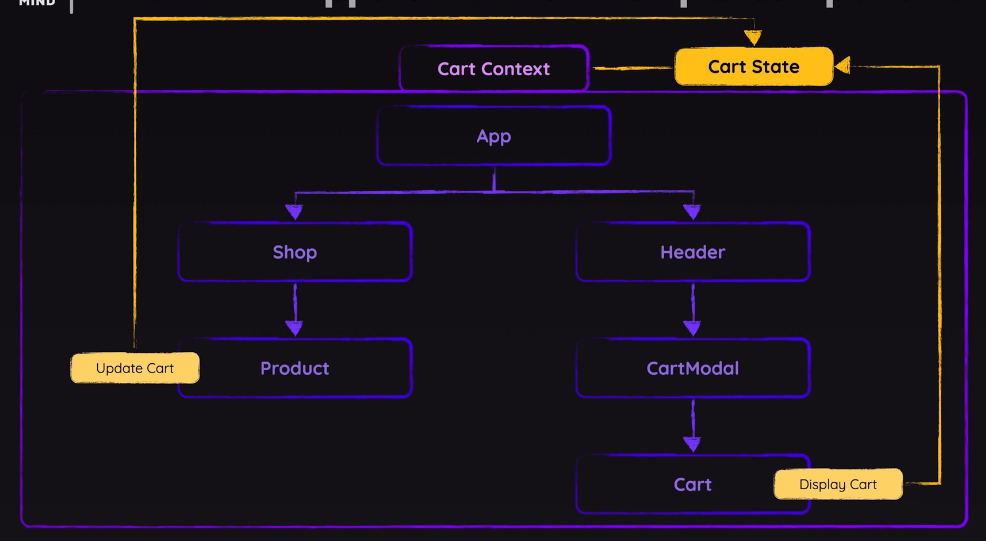
- createContext() creates an object containing a React component
//shopping-cart-context.jsx
import { createContext } from "react";
export const CartContext = createContext({
    items: []
});
//App.jsx
...
  return (
    <>
      <CartContext>
        <Header
          ...
        />
        <Shop ...>...
        </Shop>
      </CartContext>
    </>
  );
- Using the context with use or useContext
//Cart
import { use } from "react";
import { CartContext } from "../store/shopping-cart-context";

export default function Cart({ onUpdateItemQuantity }) {
  const {items} = use(CartContext);
  const totalPrice = items.reduce(
    (acc, item) => acc + item.price * item.quantity,
    0
  );
Example with Changing Theme (Black/White Mode)
//ThemeContextProvider.jsx
import { createContext, useState } from "react";
export const ThemeContext = createContext({
    theme: '',
    changeTheme: () => { },
})

export default function ThemeContextProvider({ children }) {
    const [theme, setTheme] = useState('light');
    const toggleTheme = () => {
        setTheme((prevTheme) => {
          return prevTheme === 'light' ? 'dark' : 'light';
        });
      };
    const ctxValue = {
        theme: theme,
        changeTheme: toggleTheme,
    };
    return <ThemeContext.Provider value={ctxValue}>{children}</ThemeContext.Provider>
}
- Using the context in App
//App.jsx
import Page from './Page';
import ThemeContextProvider from './ThemeContextProvider';

function App() {
  return (
    <ThemeContextProvider>
      <Page />
    </ThemeContextProvider>
  );
}
export default App;
- Using the context state in individual components
//Header.jsx
import { useContext } from "react";
import { ThemeContext } from "./ThemeContextProvider";

export default function Header() {
    const {changeTheme} = useContext(ThemeContext);
    return (
      <header>
        <h1>Demo Website</h1>
        <button onClick={changeTheme}>Toggle Theme</button>
      </header>
    );
}
- Changing the context to alter styling
//Page.jsx
import { useContext } from 'react';
import Header from './Header';
import { ThemeContext } from './ThemeContextProvider';

export default function Page() {
    const { theme } = useContext(ThemeContext);
    return (
        <div id="app" className={theme}>
            <Header />
            <article>
                <h2>React Course</h2>
                <p>A course that teaches you React from the ground up and in great depth!
                </p>
            </article>
        </div>
    );
}