What is Redux and Why Is It Important for React?
In React, there are three types of state. A state represents data that should affect the user interface when it changes.
- Local State
- valid within a single component
- Example: toggle for more details, user inputs
- useState() /useReducer()
- Cross-component State
- valid across different components
- Opening/Closing a Modal (Pop ups)
- Requires “prop drilling” or React Context/Redux
- App-wide State
- valid throughout the entire app
- Example: User Authentication or Theme
- Requires “prop drilling” or React Context/Redux
Redux helps in utilizing state across multiple components.
Why Use Redux When Context API Exists?
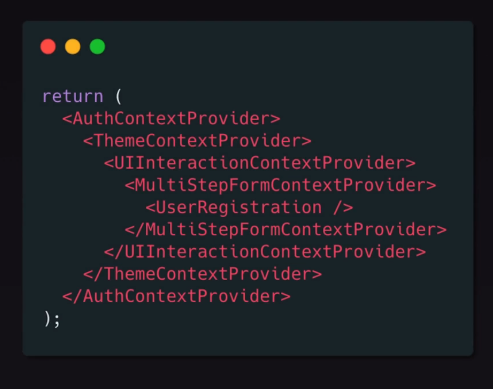
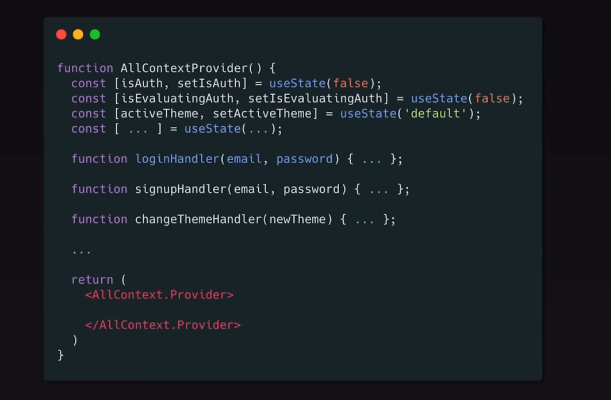
There are several drawbacks of using the React Context API:
Nested Providers lead to high maintenance overhead
Complex Providers
How Does Redux Work?
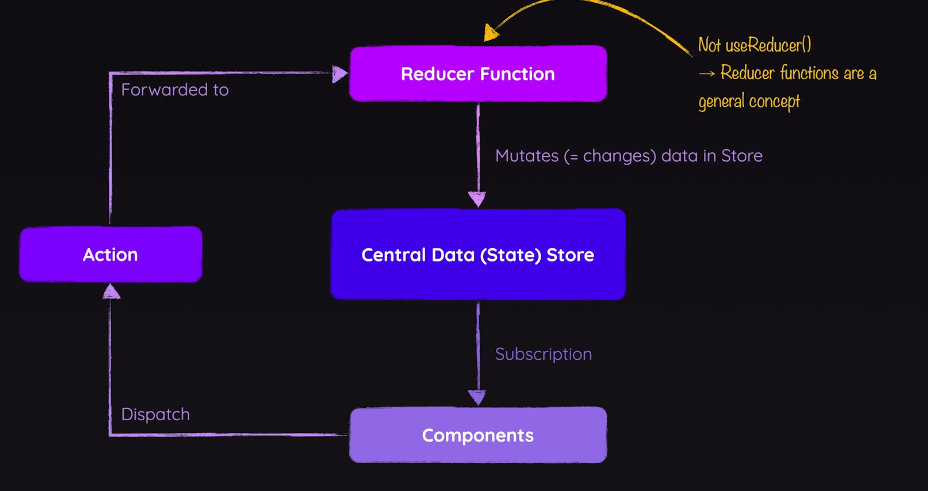
- Central Data (State) Store for the entire application
- State storage
- Components
- Retrieve data (Subscription) from the data store
- Changes occur through actions to reducer functions, which manipulate the data in the store
//redux-demo.js
const redux = require('redux');

const counterReducer = (state = { counter: 0 }, action) => {
    if (action.type === 'increment') {
        return {
            counter: state.counter + 1
        };
    }
    if (action.type === 'decrement') {
        return {
            counter: state.counter - 1
        };
    }
    return state;
};

const store = redux.createStore(counterReducer);
console.log(store.getState());

const counterSubscriber = () => {
    const latestState = store.getState();
    console.log(latestState);
};

store.subscribe(counterSubscriber);
store.dispatch({ type: 'increment'});
store.dispatch({ type: 'decrement' });

//log results
// {counter: 0}
// {counter: 1}
// {counter: 0}
Reducer Function
- is a pure function
- Input
- Old state + dispatched action
- Output
- new state object
npm install redux react-redux (React-specific)
Create React store
//store/index.js
import {createStore} from 'redux';

const counterReducer = (state = {counter: 0}, action) => {
    switch (action.type) {
        case 'increment':
            return {counter: state.counter + 1,}
        case 'decrement':
            return {counter: state.counter - 1,}
        default:
            return state;
    }
}
const store = createStore(counterReducer);

export default store;
- Integrate React store into the React app
//src/index.js
import React from 'react';
import ReactDOM from 'react-dom/client';
import './index.css';
import App from './App';
import {Provider} from 'react-redux';
import store from './store';

const root = ReactDOM.createRoot(document.getElementById('root'));
root.render(<Provider store={store}>
    <App/>
</Provider>);
- Access the Redux store in a React component
- useSelector()
//Counter.js
import classes from './Counter.module.css';
import {useSelector} from "react-redux";

const Counter = () => {
    const counter = useSelector(state => state.counter);

    const toggleCounterHandler = () => {
    };

    return (
        <main className={classes.counter}>
            <h1>Redux Counter</h1>
            <div className={classes.value}>{counter}</div>
            <button onClick={toggleCounterHandler}>Toggle Counter</button>
        </main>
    );
};

export default Counter;
- Manipulating the store
- useDispatch()
//Counter.js
import classes from './Counter.module.css';
import {useDispatch, useSelector} from "react-redux";

const Counter = () => {
    const dispatch = useDispatch();
    const counter = useSelector(state => state.counter);

    const incrementHandler = () => {
        dispatch({type: 'increment'});
    }

    const decrementHandler = () => {
        dispatch({type: 'decrement'});
    }

    const toggleCounterHandler = () => {
    };

    return (
        <main className={classes.counter}>
            <h1>Redux Counter</h1>
            <div className={classes.value}>{counter}</div>
            <div>
                <button onClick={incrementHandler}>Increment</button>
                <button onClick={decrementHandler}>Decrement</button>
            </div>
            <button onClick={toggleCounterHandler}>Toggle Counter</button>
        </main>
    );
};
How Can I Pass Variables to the Store, for Example, if the Counter Should Be Increased by X?
//store/index.js
const counterReducer = (state = {counter: 0}, action) => {
    switch (action.type) {
        case 'increment':
            return {counter: state.counter + 1,}
        case 'decrement':
            return {counter: state.counter - 1,}
        case 'increase':
            return {counter: state.counter + action.amount,}
        default:
            return state;
    }
}
//Counter.js
const increaseHandler = () => {
    dispatch({type: 'increase', amount: 5});
}
- Use Redux cache to toggle elements on and off
//store.index.js
import {createStore} from 'redux';

const initialState = {
    counter: 0,
    showCounter: true
}

const counterReducer = (state = initialState, action) => {
    switch (action.type) {
        case 'increment':
            return {
                counter: state.counter + 1,
                showCounter: state.showCounter
            }
        case 'decrement':
            return {
                counter: state.counter - 1,
                showCounter: state.showCounter
            }
        case 'increase':
            return {
                counter: state.counter + action.payload,
                showCounter: state.showCounter
            }
        case 'toggle':
            return {
                counter: state.counter,
                showCounter: !state.showCounter
            }
        default:
            return state;
    }
}
const store = createStore(counterReducer);

export default store;
//Counter.js
import classes from './Counter.module.css';
import {useDispatch, useSelector} from "react-redux";

const Counter = () => {
    const dispatch = useDispatch();
    const counter = useSelector(state => state.counter);
    const show = useSelector(state => state.showCounter);

    const incrementHandler = () => {
        dispatch({type: 'increment'});
    }

    const increaseHandler = () => {
        dispatch({type: 'increase', payload: 5});
    }

    const decrementHandler = () => {
        dispatch({type: 'decrement'});
    }

    const toggleCounterHandler = () => {
        dispatch({type: 'toggle'});
    };

    return (
        <main className={classes.counter}>
            <h1>Redux Counter</h1>
            {show && <div className={classes.value}>{counter}</div> }
            <div>
                <button onClick={incrementHandler}>Increment</button>
                <button onClick={increaseHandler}>Increse by 5</button>
                <button onClick={decrementHandler}>Decrement</button>
            </div>
            <button onClick={toggleCounterHandler}>Toggle Counter</button>
        </main>
    );
};

export default Counter;
- The return value of a reducer should not overwrite the original value
- This should not be done:
//store/index.js
const counterReducer = (state = initialState, action) => {
    switch (action.type) {
        case 'increment':
        //geht aber soll nicht gemacht werden
	        state.counter++;
	        return state;
        default:
            return state;
    }
}
Always return a new object or array
Potential Issues
- Typo errors in action types -> use CONST
- As more states are added, the returned object/array of a reducer becomes larger
- Ensure that a new object/array is always returned
Solution: Redux Toolkit
How Do I Structure States with Redux?
- One slice per state
- In a slice, use Immer to ensure a new object/array is returned
- Actions are only needed when variables need to be passed
//store/index.js
createSlice({
    name: "counter",
    initialState: initialState,
    reducers: {
        increment: (state) => {
            state.counter++;
        },
        decrement: (state) => {
            state.counter--;
        },
        increase: (state, action) => {
            state.counter = state.counter + action.amount;
        },
        toggleCounter: (state) => {
            state.showCounter = !state.showCounter;
        }
    }
});
- To use the slice, configureStore is used. If multiple slices are used, an object can be defined and passed in
//store/index.js
import {createStore} from 'redux';
import {createSlice, configureStore} from "@reduxjs/toolkit";

const initialState = {
    counter: 0,
    showCounter: true
}

const counterSlice = createSlice({
    name: "counter",
    initialState: initialState,
    reducers: {
        increment: (state) => {
            state.counter++;
        },
        decrement: (state) => {
            state.counter--;
        },
        increase: (state, action) => {
            state.counter = state.counter + action.amount;
        },
        toggleCounter: (state) => {
            state.showCounter = !state.showCounter;
        }
    }
});

const store = configureStore({
    reducer: counterSlice.reducer,
});

export default store;
How Can the State Be Changed with Redux Toolkit?
//Counter.js
import classes from './Counter.module.css';
import {useDispatch, useSelector} from "react-redux";
import {counterActions} from "../store";

const Counter = () => {
    const dispatch = useDispatch();
    const counter = useSelector(state => state.counter);
    const show = useSelector(state => state.showCounter);

    const incrementHandler = () => {
        dispatch(counterActions.increment());
    }

    const increaseHandler = () => {
        dispatch(counterActions.increase(5));
    }

    const decrementHandler = () => {
        dispatch(counterActions.decrement());
    }

    const toggleCounterHandler = () => {
        dispatch(counterActions.toggleCounter());
    };

    return (
        <main className={classes.counter}>
            <h1>Redux Counter</h1>
            {show && <div className={classes.value}>{counter}</div> }
            <div>
                <button onClick={incrementHandler}>Increment</button>
                <button onClick={increaseHandler}>Increse by 5</button>
                <button onClick={decrementHandler}>Decrement</button>
            </div>
            <button onClick={toggleCounterHandler}>Toggle Counter</button>
        </main>
    );
};

export default Counter;
How Can Multiple Slices Be Defined? Example with Login/Logout
//store/index.js
import {configureStore} from "@reduxjs/toolkit";
import counterSlice from "./counter";
import authSlice from "./auth";

const store = configureStore({
    reducer: {counter: counterSlice, auth: authSlice},
});

export default store;
//auth.js
import {createSlice} from "@reduxjs/toolkit";

const initialAuthState = {
    isAuthenticated: false,
};

const authSlice = createSlice({
    name: "authentication",
    initialState: initialAuthState,
    reducers: {
        login(state) {
            state.isAuthenticated = true;
        },
        logout(state) {
            state.isAuthenticated = false;
        }
    }
});

export const authActions = authSlice.actions;
export default authSlice.reducer;
//App.js
import Counter from './components/Counter';
import {Fragment} from "react";
import Header from "./components/Header";
import Auth from "./components/Auth";
import {useSelector} from "react-redux";
import UserProfile from "./components/UserProfile";


function App() {

    const isAuth = useSelector(state => state.auth.isAuthenticated);
    return (
        <Fragment>
            <Header/>
            {!isAuth && <Auth/>}
            {isAuth && <UserProfile/>}
            <Counter/>
        </Fragment>
    );
}

export default App;
//Auth.js
import classes from './Auth.module.css';
import {useDispatch} from "react-redux";
import {authActions} from "../store/auth";

const Auth = () => {
    const dispatch = useDispatch();

    function loginHandler(event) {
        event.preventDefault();
        dispatch(authActions.login())
    }

    return (
        <main className={classes.auth}>
            <section>
                <form onSubmit={loginHandler}>
                    <div className={classes.control}>
                        <label htmlFor='email'>Email</label>
                        <input type='email' id='email'/>
                    </div>
                    <div className={classes.control}>
                        <label htmlFor='password'>Password</label>
                        <input type='password' id='password'/>
                    </div>
                    <button>Login</button>
                </form>
            </section>
        </main>
    );
};

export default Auth;
//Header.js
import classes from './Header.module.css';
import {useDispatch, useSelector} from "react-redux";
import {authActions} from "../store/auth";

const Header = () => {
  const dispatch = useDispatch();
  const isAuth = useSelector(state => state.auth.isAuthenticated);

  function handleLogout() {
    dispatch(authActions.logout());
  }

  return (
    <header className={classes.header}>
      <h1>Redux Auth</h1>
      {isAuth && (
          <nav>
            <ul>
              <li>
                <a href='/'>My Products</a>
              </li>
              <li>
                <a href='/'>My Sales</a>
              </li>
              <li>
                <button onClick={handleLogout}>Logout</button>
              </li>
            </ul>
          </nav>
      )}
    </header>
  );
};

export default Header;
E-commerce Project Using Redux
- Core Features
- Redux for displaying/hiding the cart
- Redux for adding/removing products to/from the cart