Zielszenario
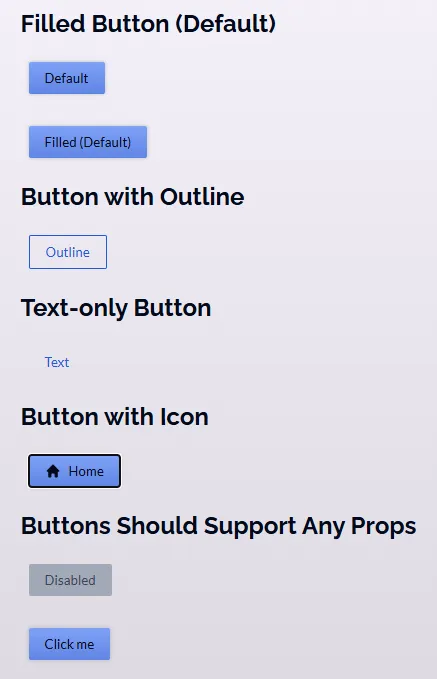
Umsetzung mithilfe einer React Komponente
//Button.jsx
export default function Button({ mode = 'filled', children, className, Icon, ...props }) {

    let cssClasses = `button ${mode}-button`;
    if (Icon) {
        cssClasses += ' icon-button';
    }
    if (className) {
        cssClasses += ' ' + className;
    }
    return (
        <button className={cssClasses} {...props}>
            {Icon && (
                <span className="button-icon">
                    <Icon />
                </span>
            )}
            <span>
                {children}
            </span>
        </button>);
}
//App.jsx
import Button from './Button';
import HomeIcon from './HomeIcon';

function App() {
  return (
     <div id="app">
      <section>
        <h2>Filled Button (Default)</h2>
        <p>
          <Button>Default</Button>
        </p>
        <p>
          <Button mode="filled">Filled (Default)</Button>
        </p>
      </section>
      <section>
        <h2>Button with Outline</h2>
        <p>
          <Button mode="outline">Outline</Button>
        </p>
      </section>
      <section>
        <h2>Text-only Button</h2>
        <p>
          <Button mode="text">Text</Button>
        </p>
      </section>
      <section>
        <h2>Button with Icon</h2>
        <p>
        <Button Icon={HomeIcon}>Home</Button>
        </p>
        <p>
        </p>
      </section>
      <section>
        <h2>Buttons Should Support Any Props</h2>
        <p>
          <Button mode="filled" disabled>
            Disabled
          </Button>
        </p>
        <p>
          <Button onClick={() => console.log('Clicked!')}>Click me</Button>
        </p>
      </section>
    </div>
  );
}
export default App;